Process Control Project
The objective of the process control project is to understand, control, or optimize a dynamic system and communicate conclusions that are supported by evidence. A project may use a browser-based simulation or digital twin, a physical experiment, or a combination of the two. Every project must identify a controlled variable, manipulated variable or actuator, measurement or sensor, important disturbances, and a controller or optimizer. The project is open-ended by design so that students can pursue an application from the APMonitor app collection, a research group, or a personal or professional interest.
The APMonitor Simulation and Control Apps provide project starting points that run in a browser with no installation. The collection includes more than 80 dynamic applications in control fundamentals, chemicals and polymers, oil and gas, nuclear energy, power and storage, water and utilities, manufacturing, bioprocessing, vehicles, and other areas. Each app is a launch point rather than a completed project: define a focused engineering question, design experiments, export or record results, and extend the analysis beyond the default demonstration.
An app-based project may include a starting paper draft. You are welcome to refine that draft or begin from scratch. If you use the draft, take ownership of it by checking every equation, assumption, parameter, result, figure, and reference; replacing preliminary content with results from your own experiments; and explaining what the evidence does and does not support. Publication is not required. The purpose is to practice technical judgment, control-system design, and clear communication.
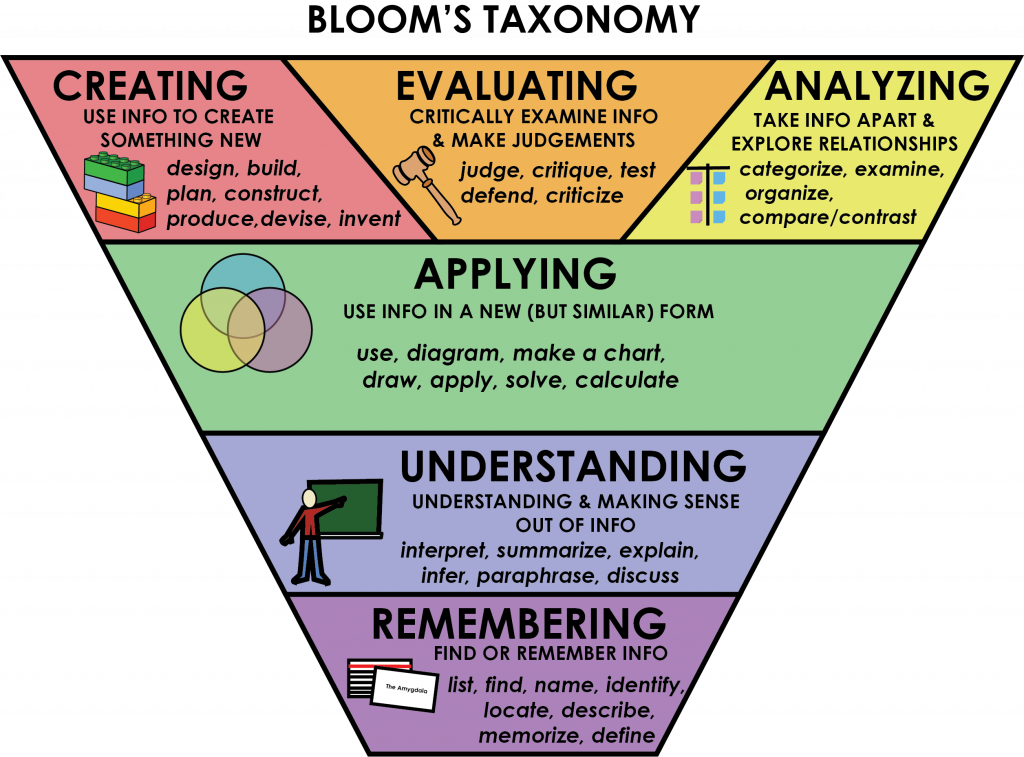
Consider technical as well as non-technical issues related to the project. Non-technical issues may include safety, public health, and welfare in addition to global, cultural, social, environmental, and economic factors. The purpose of the project is to achieve higher levels of learning (see Bloom's Taxonomy figure by Rawia Inaim, Kwantlen Polytechnic University) by evaluating and analyzing with principles of dynamics and control to create something new.
The project report consists of a 5-minute presentation and a 2-page document that explain the project and the approach used to implement and evaluate an automation strategy.
- Introduction with a statement of the problem and objective of the project
- Derivation of the mathematical simulation of the physical system
- Details on the sensor, actuator, and controller
- Simulations or measurements of closed-loop performance
- Conclusions and future opportunities
- A brief disclosure of how Generative AI was used and how its output was verified
Choose a Project Path
- App plus starting paper draft: select an application from APMonitor Apps, identify a question or extension, and transform the supplied draft into a verified account of your work.
- App with a new report: select an app as the dynamic system, design a new investigation, and write the report from scratch.
- Original simulation or physical system: propose another dynamic system related to engineering, research, employment, or personal interest. Physical systems should include a safe sensor, actuator, and controller implementation.
Regardless of the path, the submitted work must go beyond operating the default app. Compare alternatives, test disturbances, identify or derive a model, tune and evaluate a controller, quantify performance, and explain limitations. Teams are encouraged to connect an app to hardware or use it as a digital twin when that connection strengthens the project.
Starting Paper Drafts
A starting paper draft is a scaffold, not an answer key or a finished result. Begin by marking:
- claims, equations, parameters, and references that must be verified;
- figures and tables that must be regenerated from your own app runs, simulation, or measurements;
- missing tests, comparisons, uncertainty analysis, safety considerations, and limitations;
- decisions that require human engineering judgment; and
- sections where the draft overstates what the evidence supports.
The final report should reflect the team's own decisions and evidence even when a draft or Generative AI produced the first version. A team may discard any part of the starting draft or choose not to use it.
Project Proposal
- Identify the app or original dynamic system and state the engineering question that the project will answer.
- Explain what the team will add beyond the default app demonstration or existing starting draft.
- Draw a diagram of the system with all parameters and variables labeled.
- List 2-3 credible articles that give related results or identify authors who have worked in this area. Verify that every reference exists and supports the associated claim.
- List factors that cannot change that influence the dynamic outcome (constants / parameters).
- List a factor that can change to influence the dynamic result as an actuator. Can this factor be adjusted by the controller?
- What is the controlled variable? Is it important that the controlled variable remain within a range or at a particular set point? Does the set point change over time?
- List equations that describe the dynamic response such as equations of motion, mass balance, energy balance, etc.
- List factors that may influence the success of the project. Where are the uncertainties and how will these uncertain factors be addressed?
- What is the timeline for the project and the anticipated final product for this project?
- If using a starting draft or Generative AI, identify how the team will verify equations, code, data, figures, claims, and references.
Project Progress Report #1
The first project progress report should describe the input-to-output dynamic relationships, including the constants, parameters, variables, and equations of the dynamic system. Show open-loop simulation results or the measured response to a disturbance or actuator change. Update the project timeline, discuss the uncertainties identified in the proposal, and connect 2-3 verified references to the work. This progress report becomes the draft section of the final report that includes the introduction, literature review, and model description. If the project began with a paper draft, also identify what was retained, corrected, replaced, or still needs verification.
Project Progress Report #2
The second project progress report should discuss dynamic data generated by the team with the app, a separate simulation, or physical measurements. Include a sensitivity analysis that shows the steady-state and dynamic relationships between the actuator and controlled variable. Estimate a FOPDT, SOPDT, or higher-order representation useful for controller tuning and report fit quality. If the project does not include physical measurements, include an appropriate level of simulated measurement noise and label it clearly. Never invent measurements or report AI-generated values as experimental data. This progress report becomes the model-estimation section of the final report.
Project Progress Report #3
The third project progress report should discuss closed-loop control and present results for both setpoint tracking and disturbance rejection. Quantify performance with suitable measures such as offset, rise time, settling time, overshoot, IAE, or actuator movement. Show how the final tuning or optimization strategy was selected. Besides standard methods learned in the class (PID, feedforward, and cascade control), discuss at least one alternative hardware or software approach and cite the sources used to learn about it. This progress report becomes the closed-loop control section of the final report. Verify any AI-suggested controller, tuning rule, or interpretation with equations, code tests, app experiments, or measurements.
Project Report
The project report is a concise, integrated revision of the three progress reports, not a simple concatenation. Include additional content such as stability analysis, tuning, feedforward, or other control methods when it improves the engineering argument. Whether the report began with a supplied draft, a Generative AI draft, or a blank page, the team is responsible for the final technical accuracy and clarity. Publication is optional and is not part of the course requirement.
The project report may include the following elements:
- Title, authors
- Abstract
- Introduction / Literature review
- Theory / Methods / Physics-based modeling
- Simulation results or Hardware Description
- Model fitting results
- Control tuning / Stability analysis
- Discussion
- Conclusions / Future work
- Generative AI use and verification statement
- References
The recommended final report length is 2 pages, although individual progress reports may be longer based on the scope of the project and number of team members involved. Explain how each of the following factors affects the design of the automation system. Address each category separately; if one is not applicable, state why. Extensive detail is not required, but claims should be specific to the project and supported by engineering judgment or evidence.
| Factor and definition, with overarching focus on its impact on engineering designs | Examples or details from the curriculum or the field of chemical engineering |
|---|---|
|
Public health State of well-being of people in both physiological and psychological senses. |
|
|
Public safety Mitigation of hazards through risk analysis; prevention of physical harm to people from unit, process, or plant operations. |
|
|
Public welfare Provision of the basic needs of people. |
|
|
Global factors Consideration of connectivity and being part of a worldwide community. General improvement of infrastructure and quality of life. |
|
|
Cultural factors Characteristics and knowledge of a particular group of people and their values, encompassing customs, traditions, language, religion, cuisine, music, arts, holidays, worldview, perspectives, and history. |
|
|
Social factors Issues that affect interpersonal interactions. Human-to-human relationships and considerations that generally transcend culture and broadly apply to all people and societies. |
|
|
Environmental factors Recognition that local and global ecosystems must be protected through wise stewardship of resources. Minimize impacts on, and if possible improve, the ecosystem. |
|
|
Economic factors Recognition that businesses must be profitable and that other ventures, including nonprofits and governments, must be financially sustainable to continue operations. |
|
Include a paragraph in this section about the learning strategies you used to acquire and apply the knowledge needed for the project.
The Research & Writing Center (3340 HBLL) is a free resource where trained consultants provide assistance on assignments. Schedule an appointment to receive writing help at all stages of the research and writing process.
Project Presentation
The project presentation is a 5-minute video of your project. It includes the same elements as the final report but in a condensed and graphical format. Many groups choose to make a screencast that records a computer desktop with narration. Post the video to YouTube and include a link in the project report.
ABET Outcomes
ABET Outcome 1 (Assessed with Project Parts 1-2 Reports): Students will be able to identify, formulate, and solve complex engineering problems by applying principles of engineering, science, and mathematics.
ABET Outcome 2 (Assessed with Project Final Report): Students will be able to apply engineering design to produce solutions that meet specified needs with consideration of public health, safety, and welfare, as well as global, cultural, social, environmental, and economic factors
ABET Outcome 7 (Assessed with Project Part 3 Report): Students will be able to acquire and apply new knowledge as needed, using appropriate learning strategies.
Arduino Microcontrollers
Arduino microcontrollers are versatile, open-source hardware platforms that simplify the process of creating interactive electronic projects. They feature a microcontroller unit that can be programmed to read inputs, like sensors or switches, and control outputs, such as motors, LEDs, or other actuators. Known for their ease of use, Arduino boards are widely used in education, prototyping, and hobbyist projects, making complex tasks like data acquisition and automation more accessible to beginners and professionals alike. Their extensive library support and large community make it easy to implement various applications, from simple DIY projects to advanced control systems.
Instrumentation and Control Course at Notre Dame
Analog and digital pins on the Arduino support reading and writing values to add a sensor or actuator. The firmware that is pre-loaded (tclab.ino) on the Temperature Control Lab is specific to that lab with 2 heaters, 2 temperature sensors, and 1 LED. A different firmware called Standard Firmata can be loaded onto the Arduino to allow the pyFirmata (Python) package to read from or write to any of the pins. This may be useful if you are adding additional sensors, an actuator, or want to modify the pin connections.
# pip install pyfirmata
from pyfirmata import Arduino, util
# for MacOS or Linux
# install CH340G driver from https://goo.gl/pWMcU3
#board = Arduino('/dev/cu.wchusbserial1420')
# for Windows
board = Arduino('COM3')
# Start iterator
iterator = util.Iterator(board)
iterator.start()
# TMP36 Temperature Sensor Calibration
def TMP36(Tv):
return (Tv*5000.0-500.0)/10.0
# Read voltage (0-5 V) as (0-1)
Tv1 = board.get_pin('a:0:i')
Tv2 = board.get_pin('a:2:i')
# Setup Temperature functions
def T1():
return TMP36(Tv1.read())
def T2():
return TMP36(Tv2.read())
# Setup Heater functions with PWM
H1 = board.get_pin('d:3:p')
H2 = board.get_pin('d:5:p')
time.sleep(1.0)
# Print Temperature 1
print('Temperature 1: ' + str(T1()))
print('Temperature 2: ' + str(T2()))
# Turn on heaters
print('Heater 1: 90% and Heater 2: 20%')
H1.write(0.9)
H2.write(0.2)
# Wait
print('Sleep for 25 seconds')
time.sleep(25.0)
# Print Temperatures 1 and 2
print('Temperature 1: ' + str(T1()))
print('Temperature 2: ' + str(T2()))
# Turn off heaters
H1.write(0.0)
H2.write(0.0)
board.exit()
Other Python packages facilitate prototyping development on an Arduino. Arduino-Python3 Command API is another standard interface like pyFirmata to load a standard firmware with a Python library to access the pins. A different method is to use uFlash to build a HEX file and flash it to the Arduino firmware to run micro-Python directly on the Arduino. This is different than pyFirmata and Arduino-Python3 packages that run Python on an external computer and communicate over the serial USB connection. The uFlash package allows Python to run directly on the Arduino with no external computer connection.
ESP32 Devices (Preferred)
ESP32 devices running MicroPython offer a powerful alternative to Arduino boards that run C code. With built-in Wi-Fi and Bluetooth capabilities, the ESP32 is well-suited for IoT applications and projects requiring wireless communication. MicroPython, a lightweight implementation of Python, allows for easier and faster development, especially for those familiar with Python programming. However, the tradeoff comes with performance and memory usage: C code on Arduino is generally more efficient and better suited for real-time, low-latency applications. While MicroPython simplifies programming, it can introduce challenges when precise timing and low-level hardware control are necessary. The choice between the two often depends on the project complexity and familiarity with each language. See Data-Driven Engineering Sensors for help with ESP32 devices.
Generative AI: Engineer as Architect of Ideas
In the era of Generative AI, an engineer's role in technical communication is shifting from producing every first line of code or prose to being an architect of ideas. Generative AI can accelerate planning, coding, visualization, critique, and drafting, but the engineer must define the problem, choose the evidence, test the implementation, evaluate alternatives, and decide what the final work claims. The student team is the engineer of record for everything it submits.
Use Generative AI as an engineering collaborator, with these responsibilities remaining with the team:
- define the control objective, assumptions, constraints, and success measures;
- generate results by running the app, simulation, or experiment rather than asking AI to invent data;
- verify equations, units, signs, parameter values, code, controller action, and physical limits;
- open and check every reference instead of trusting a generated citation;
- distinguish observations from interpretations and identify uncertainty or unsupported claims;
- select the figures, comparisons, and narrative that best support the engineering conclusions; and
- disclose where AI contributed and describe at least one important check, correction, or rejection of its output.
The structured prompt builders from the Machine Learning for Engineers course can help organize the work:
- Agentic Workplan - generate and critique a project workplan with tasks, checkpoints, and deliverables before you build.
- Agentic Coding - structured prompts for microcontroller and Python code with testing and validation requirements.
- Agentic Visualization - design the plots and dashboard that communicate your control performance.
- Agentic Reports - draft the report and presentation, with you supplying the correct results, assumptions, and justifications.
The course TA skill (for Claude, ChatGPT/Codex, or Gemini) is especially useful during the project: it includes context about the EE assignment series, the apps, the TCLab, and the course AI policy, and its agent versions (AGENTS.md/GEMINI.md) work inside the project code folder.
For perspective on learning, character, and human responsibility at BYU, consider Elder Gerrit W. Gong's address Becoming BYU in an Age of Artificial Intelligence.
Starter prompt for an app or hardware project:
Project Example
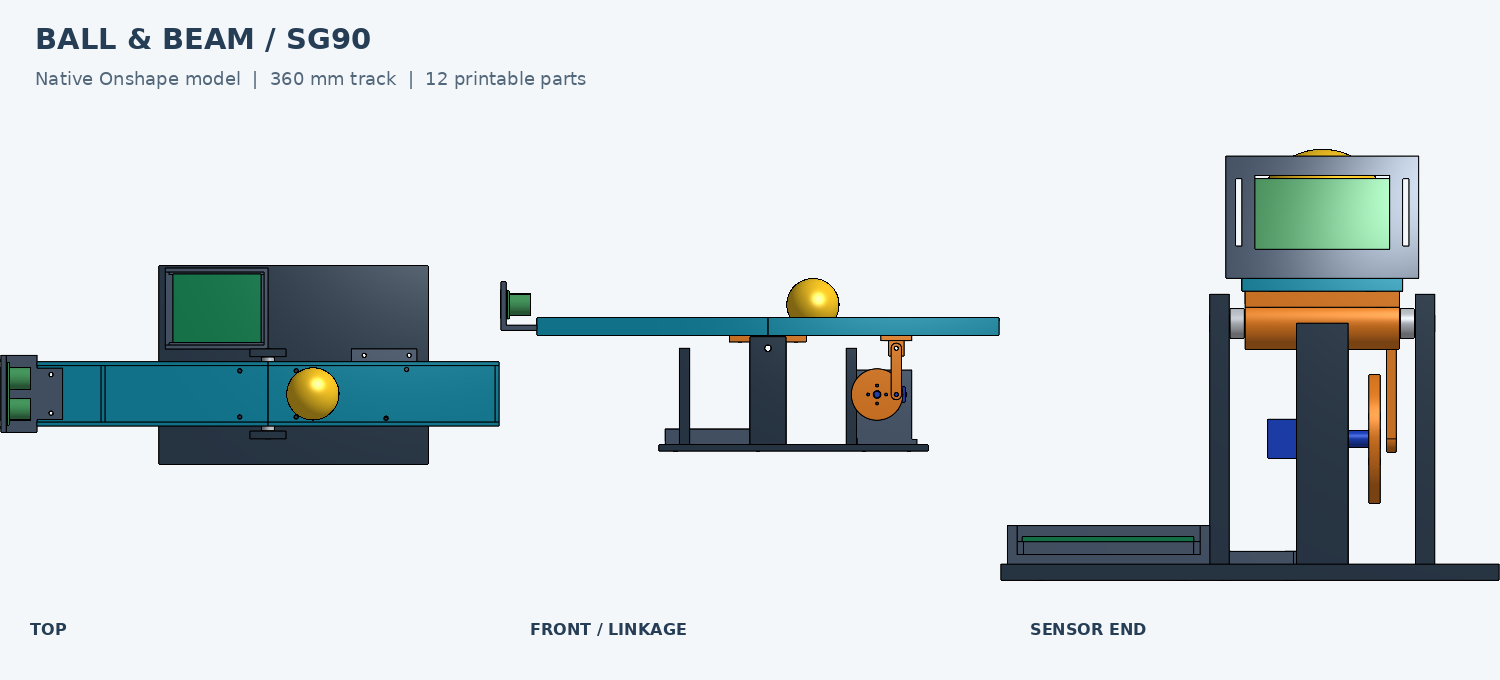
- OnShape CAD Software (free for students) | Use GenAI with FeatureScript MCP
- Balance Beam Simulator
- Balance Beam 3D Print Files (zip archive)
Simulation and Control Apps
Browse the current APMonitor Apps catalog. The collection spans foundational PID examples and industrial systems in chemicals, energy, water, manufacturing, life sciences, vehicles, networks, and other fields. Good starting points include the TCLab Control Studio, TCLab Simulation Studio, and Model Fitting and Tuning Studio. Many apps include detailed instructions, model equations, adjustable parameters and disturbances, performance measures, and data export.
Use an app as an experimental platform:
- Record a reproducible baseline case and define the question to investigate.
- Perform open-loop tests and identify the important gains, time constants, delays, interactions, constraints, or nonlinearities.
- Fit or derive a model and state its range of validity.
- Compare controller structures or tuning choices under both setpoint and disturbance tests.
- Quantify performance and actuator effort; do not rely only on screenshots or qualitative impressions.
- Test uncertainty, noise, saturation, failure modes, safety implications, or economic tradeoffs relevant to the application.
- Explain what was learned beyond the default app scenario and what would still need to be validated on a physical system.
When a starting paper draft accompanies the selected application, use app experiments to reproduce, revise, or reject its claims. Regenerate the figures and tables that support the final report. A project that mirrors an app with hardware may also use the app as a digital twin for controller tuning and safe preliminary testing.
Project Report: What to Turn In
The report and presentation (5 minutes) should curate the work into a demonstration of engineering judgment. A polished draft is valuable, but publication is not required. The report must answer:
- What was the control objective (CV, MV, disturbances, constraints), and how did the simulation or hardware implement the measurement, actuator, controller, and safe state?
- What model did you identify for your process (form, parameters, fit plot), and how did it inform the controller tuning?
- What evidence did the team generate, and what assumptions or uncertainties limit the conclusions?
- How well does the controller work? Show setpoint tracking and disturbance rejection with quantified performance and actuator effort.
- What did the team add or improve beyond the default app and any supplied paper draft?
- What did AI contribute to the plan, code, plots, or report; what did it get wrong or leave uncertain; and how did the team verify the final results?