ChE 436: Temperature Control Lab
Featured in CACHE News, December 2014.

MATLAB / Arduino Temperature Control Lab
This lab is an application of feedback control for a temperature control device. Complete instructions are available below in the temperature control lab description. The lab can be run on personal computers or on workstations in the UO Lab. Kits are available for temporary use and should remain in the UO Lab. The lab files are intended for MATLAB 2013B and earlier. For the latest versions, see the new Temperature Control Lab.
 
|
- Temperature Control Lab Description
- Temperature Control Lab Files (SISO)
- Temperature Control Lab Grading Sheet (2 page Executive Summary)
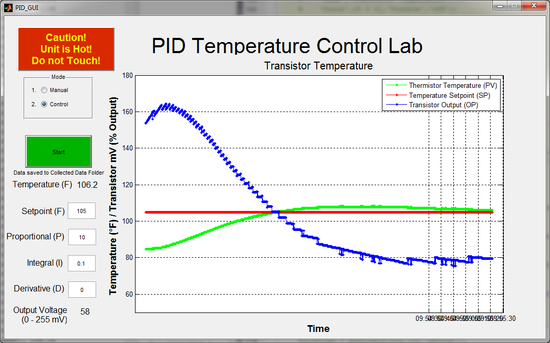
Students have an opportunity to use this lab throughout the semester to learn principles of system dynamics and control. In particular, this lab reinforces:
- The difference between manual and automatic control
- Step tests to generate dynamic data
- Fitting dynamic data to build a simple First Order Plus Deadtime (FOPDT) model
- Obtaining parameters for a PID control from standard tuning rules
- Tuning the PID controller to improve performance
- Stability analysis
- Dynamic modeling with first principles
- Dynamic data reconciliation
- Model Predictive Control
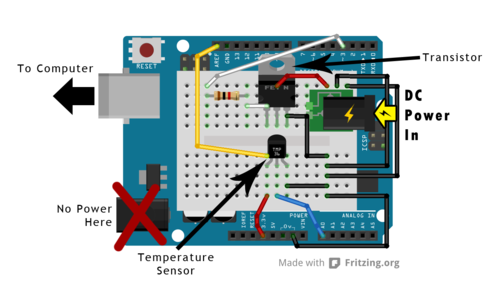
The three important elements for a control loop are the measurement device (thermistor temperature sensor), an actuator (voltage to the transistor), and capability to perform computerized control (USB interface). At maximum output the transistor dissipates 3.1 W of power with a voltage of 8.9 V and current of 0.35 A. The heat generated by the transistor transfers by radiation, convection, and conduction to the temperature sensor.
Stability Analysis and PID Tuning in Simulink
Root Locus Stability Analysis
Solve and Linearize an Energy Balance Model with MATLAB
MIMO (Multiple Input / Multiple Output) Version
Generative AI Learning
Use these prompts around your lab sessions. Direct the AI - the step tests, fits, and tuning decisions are yours; the AI checks, quizzes, and debugs with you.
Debugging MATLAB/Arduino connection or code problems with AI is encouraged - paste the exact error message and your script. Make the AI explain the fix, and re-run the step test yourself: never let it invent data for a run that did not happen.
App: The browser-based TCLab Control Studio and TCLab Simulation Studio are digital twins of this lab's heater/thermistor hardware. Practice the whole workflow before your scheduled lab time: run a step test, fit Kp, tau-p, theta-p with sliders against a live objective function, and try your PID tuning - then confirm on the real device, where the fan of a neighboring laptop is a genuine disturbance.
What to Turn In
The deliverable is unchanged: a 2-page executive summary per group (see the grading rubric above). You may use Generative AI to help draft and format it, but you must guide it to the correct data, fits, justifications, and assumptions. A strong summary answers these questions with your own plots and numbers:
- Show the step-test data with the FOPDT fit overlaid, and report Kp, tau-p, theta-p with units. How well should this model extrapolate to a different heater level, and why?
- Report your PID tuning, the correlation it came from, and the closed-loop setpoint response (plot). Where did predicted and observed behavior differ, and what explains the gap?
- Show one disturbance or saturation test and explain what the integral term did during it.
- Where did AI assist (debugging, drafting, checking), and what did you verify before trusting it? Include one prediction you committed to before a run and whether the hardware agreed.
