
Model Fitting and Tuning Studio
Bring your own data · fit FOPDT, SOPDT or ARX · then tune a PID loop on the model you fitted
This is the only app in the collection that starts with your data. Upload a CSV or an Excel workbook — or start from one of five built-in records — pick the time, input, and output columns, and fit a first-order plus dead time, second-order plus dead time, or ARX model to it. Then cross to the second tab, where nine published tuning correlations turn that model into PID gains and every one of them is run through a closed-loop step test on the model you just fitted, so the table shows both the gains and what they do.
1. Overview
This guide covers both halves of the app: the identification half — the three model forms, the graphical constructions, the least-squares solve, the fit window and what it is for — and the tuning half — the IMC, ITAE, Ziegler–Nichols, Cohen–Coon, Tyreus–Luyben and SIMC correlations, where the equivalent FOPDT they are all given comes from, and how to read a closed-loop comparison without fooling yourself.
For faculty
Section 2 is lecture background, section 3 is what to demonstrate live, and the scenario table in section 3 is assignable as-is. Section 5 says what not to claim.
For students
Start at section 3, run the app while you read, then come back to section 4 to connect what you saw to the equations. Nothing here is graded. The app is.
For practitioners
Section 2 places Model Fitting and Tuning Studio against the real unit operation, section 4 gives the model you would have to replace, and section 5 is the honest gap list.
The one-paragraph version
Load a record. Press Graphical to read
Kp, τp and θp off the largest
step with the 63.2% construction, then Optimize to let a simplex do better.
Read the residual, not just the score. Cross to Tune the loop: every correlation is
computed from the equivalent FOPDT shown on the left and simulated on the fitted model, so you can
compare overshoot, settling time, IAE and total actuator travel side by side. Then turn up the
dead-time mismatch to twice what you identified and find out which of those tunings you would
actually commission.
2. Background
The engineering problem
You have a record of a process: time, something you changed, and something you measured. You want a model of it, and then you want controller settings. That is the sequence the whole course is built around, and it is the sequence this app implements without a break in it:
- Get the data in. CSV or XLSX, any column order, any names, evenly sampled or not.
- Choose a form. FOPDT, SOPDT, or ARX. Three different theories of what the process is.
- Fit it. Graphically, the way it is done on paper, and then numerically.
- Check it against data it has not seen, using the fit window.
- Turn it into gains with a published correlation.
- Test those gains in closed loop, and then test them again on a plant that is not quite the model.
Steps 5 and 6 are the ones most often skipped, and they are the ones that decide whether the model was worth fitting.
Where it sits in control theory
This app sits at the junction of three weeks of the course: empirical modeling, graphical and regression fitting, and PID tuning correlations. A few ideas do most of the work:
- Deviation variables. Everything is fitted about the first sample of the record:
y′ = y − y(0)andu′ = u − u(0). That is why no model here has a bias term, and why the record should start at a steady state if you can arrange it. - A graphical fit is a real fit.
Kp = Δy/Δufrom the two steady levels,θpfrom when the output starts to move,τpfrom the 63.2% crossing. Three numbers off a chart, defensible on their own, and a far better starting point for an optimizer than a guess. - Squared versus absolute error. The objective is selectable, and it matters most when the model is the wrong shape: least squares chases the few big residuals a structural error produces, absolute error does not. The app's tests pin a case where the absolute-error fit lands closer to the truth.
- Fewer identifiable parameters than written parameters. A single step cannot separate everything. Narrow the fit window and the same fit gets worse on the data it did not see — that gap is the honest measure of a model, and the app reports it as a separate validation RMSE.
- One step ahead is not the same as free running. An ARX model fitted by least squares is minimizing one-sample prediction error while being handed the measured history every sample. Switch it to free running and a model that has learned the noise falls apart. This is the single most useful button in the ARX section, and free running is what the app shows by default.
- Identification is a linear solve, and the preprocessing is part of the model. The ARX
form here is the explicit solution that GEKKO's
sysidcomputes withpred='meas', ported to run in the browser. Whether the data is scaled, and what the regression measures from — a fitted constant, the first point, the mean, or nothing — are options that change the answer, not conveniences. They are exposed as controls for that reason. - Every tuning correlation is written for a FOPDT model. So a SOPDT or ARX model has to be reduced to one before a correlation can be applied, and the app shows you which reduction it used: Skogestad's half rule for an overdamped second-order model, and a measured step response for an underdamped or ARX one.
- Correlations disagree, and the disagreement is informative. On a record with
θ/τnear 1, Ziegler–Nichols and IMC conservative differ by more than an order of magnitude in controller gain. Both are published. Neither is wrong. The closed-loop test is what tells you which one you want. - Robustness is not an afterthought. A tuning tested on the model it was derived from is being graded on its own homework. The mismatch multipliers change the plant and leave the tuning alone, which is what commissioning actually does to it.
What this app teaches
- How to get real data into a model: column mapping, missing samples, uneven sampling, and why a record should start at steady state.
- The graphical FOPDT construction, the two-point variant, and the SOPDT construction from overshoot and ringing period.
- That the fit objective is a modeling choice, not a detail.
- The difference between a fit score and a validation score, and how to produce the second one.
- That an ARX model's one-step-ahead prediction flatters it, and what free running reveals.
- Where PID gains come from: IMC, ITAE, Ziegler–Nichols, Cohen–Coon, Tyreus–Luyben, SIMC — and that they are all functions of the same three numbers.
- How to read overshoot, settling time, IAE and total variation together instead of one at a time.
- Why a tuning that looks best on the model can be the worst one on the plant.
The application in practice
This is the working loop of process control, and it is done with a spreadsheet and a plot far more often than with anything fancier. An engineer bumps a valve, exports the historian data, fits a FOPDT model, applies a correlation, and loads the numbers. What separates someone good at it from someone merely done with it is the two steps in the middle: validating the model on data it was not fitted to, and testing the tuning against a plant that is not quite the model.
The app's five sample records are drawn from that experience. The heater records are generated from two lags and a transport delay, so a FOPDT fit cannot be exact — which is the normal situation, not a special case. The tank record is nonlinear, so the gain you identify depends on which step you fit. The composition record is reverse acting with a dead time as long as its time constant, which is where feedback alone starts to run out.
Automation and its broader implications
Everything here is a step on the way to something automatic. Model identification from routine operating data is what makes adaptive control and plant-wide monitoring possible; the tuning correlations are the arithmetic inside every auto-tune button ever shipped. It is worth knowing what those buttons do, because they inherit the assumptions on this page — including that a first-order model with a delay is an adequate description of the plant, and that the plant will still be the same next month.
The honest limit is visible in the app itself. Above θ/τ ≈ 1 every correlation is
extrapolating and the closed-loop tests get worse together. That is the boundary where the course
moves on to feedforward, cascade, and model predictive control — and the other apps in this
collection pick up exactly there.
3. Operating the app
The app runs entirely in your browser. Uploaded files are read locally and never sent anywhere — the page has no server to send them to. There is no hardware, no PHP, and nothing to install.
The two tabs at the top are a sequence, not a preference: 1 · Fit the model, then 2 · Tune the loop. Everything on the second tab is computed from whatever is on the first.
Interface anatomy
On the fitting tab, left to right:
- Load a record (left): the sample-data selector, Upload CSV or XLSX, a worksheet selector for multi-sheet workbooks, the three column selectors, a preview of the first rows with the mapped columns tinted, and the record's summary — usable samples, length, and median sample interval. Anything the app had to do to the data, such as dropping a row with a blank cell, is listed underneath.
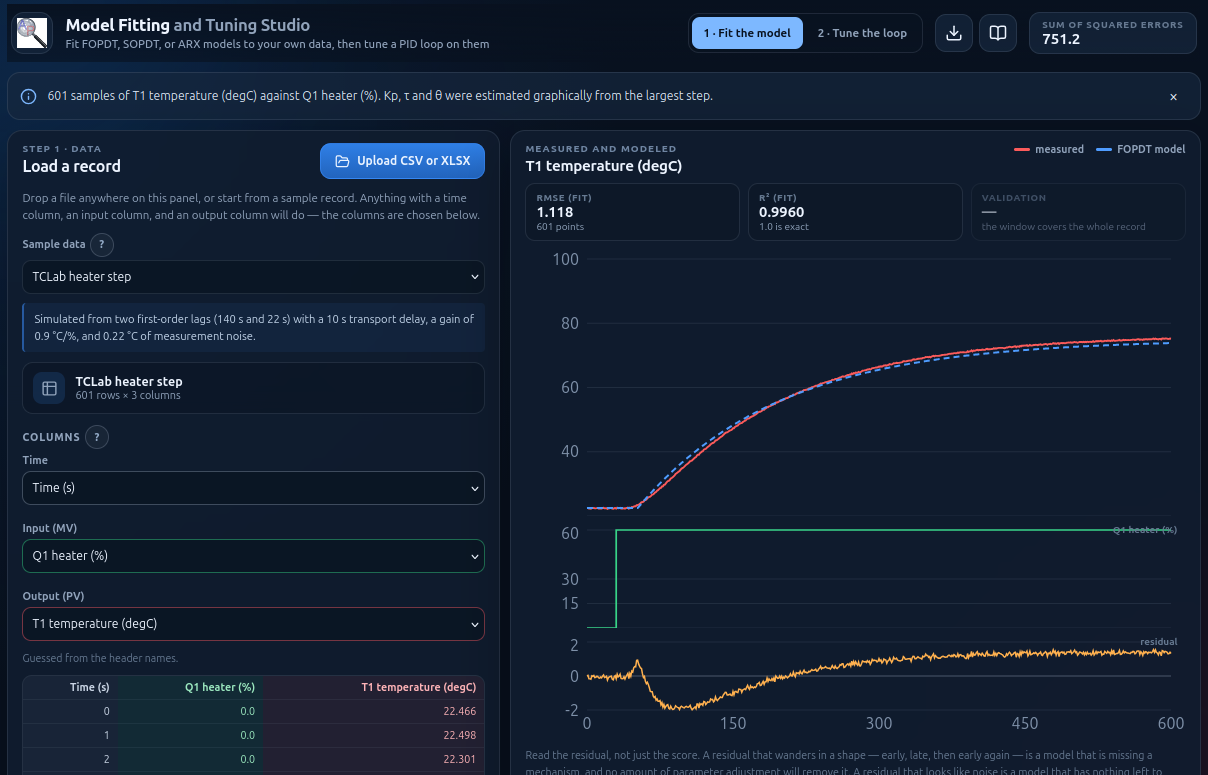
- Charts (center): measured versus model with the fit and validation scores above it, then the input signal, then the residual. All three share a cursor. When a graphical estimate has been run, its construction lines are drawn on the top chart.
- Fit a model form (right): the form switch, the equation, the parameter sliders, the ARX diagnostics when ARX is selected, the objective, the fit window, and the three actions — Graphical, Two-point, Optimize.
On the tuning tab:
- Equivalent FOPDT (left): the three numbers every correlation is given, where they came from, the dead-time ratio, and the ultimate gain and period.
- Step test setup: setpoint step, load change, sample time, test length, output limits, and where the derivative acts.
- Plant–model mismatch: three multipliers that change the plant and leave the tuning alone.
- Closed loop (right, top): the setpoint step for every checked rule on one chart, with the controller outputs beneath.
- Correlations and what they do (right, below): every rule, its gains, and its own closed-loop scores. The By hand row at the bottom takes typed gains, and the arrow button on any row copies that rule's gains into it.
One design note worth knowing: each model form keeps its own parameters, so switching between FOPDT and SOPDT never discards a fit in progress.
First run, step by step
Look at the data first. The app opens on the TCLab heater step sample: 601 samples, one 60% heater step at 30 s, a temperature that settles around 76 °C. Check the three column selectors and the preview. Always check the mapping — an input and an output swapped by accident still fit something.
Read the model off the chart. Press Graphical. The gain comes back near 0.9 °C/%, which is the value the record was generated with, and the construction lines appear: the two steady levels, the 63.2% line, and the vertical marks for
θandτ.Then let the optimizer try. Press Optimize. The status line reports the objective before and after and how many model evaluations it used. The score improves — and the residual chart still has a shape.
Find out why it cannot be zero. This record was generated from two lags (140 s and 22 s) and a 10 s transport delay. No first-order model has anywhere to put that. Switch to SOPDT, press Graphical then Optimize, and watch the residual flatten.
Try the form that is solved rather than searched. Switch to ARX. It identifies the moment you arrive — there is no Optimize button, because least squares has already returned the one best answer for those orders. Leave
naandnbat 2 and raisenkfrom 0 to 15 a few steps at a time: the free-running RMSE falls from about 2.3 to 1.2 °C and the steady-state gain walks from 1.02 down toward 0.96, closing on the 0.9 the record was built with. Then check what it cost: every step added five more coefficients. Narrow the fit window and see whether the validation score agrees that the model got better. Finally, switch the prediction from Free running to One step ahead and watch the score improve for no good reason at all.Validate. Set the fit window end to 300 and watch a validation RMSE appear beside the fit RMSE. Load the TCLab doublet test sample, fit only the first transition, and score the two the model has never seen.
Cross to the tuning tab. The equivalent FOPDT is on the left with its
θ/τratio. The table on the right has nine correlations, their gains, and what each one did in a closed-loop step test on your model.Compare, then break it. Check three or four rules to plot them together. Then move the dead time × slider to 2.0. The aggressive tunings start ringing or going unstable; the conservative ones barely notice. That is the decision the correlations cannot make for you.
Getting your own data in
CSV, TSV, or text. The delimiter is guessed from the first few lines by
finding the one that gives every line the same column count — so a European file with decimal commas
and semicolon separators reads correctly. Lines starting with # or % are
skipped, which means a CSV exported from this app, or any other app in this collection, can
be read straight back in with its metadata header intact. A file with no header row gets positional
column names.
XLSX. Workbooks are read directly, with no library: an .xlsx file is a zip of XML, and the browser already has a decompressor and an XML parser. Every worksheet is offered in a selector. Number formats are ignored, so a column formatted as a clock time arrives as the fraction of a day Excel actually stores — put elapsed seconds or minutes in your time column and this never comes up. Very old .xls files are not supported; save as .xlsx or CSV.
What makes a good record. Start at a steady state. Move the input in clear steps and let each one settle. A doublet — up, down, back — is worth far more than a single step, because it gives you something to validate against. And record the input the process actually saw, not the setpoint of some other loop.
The column mapping, and why it is not automatic
The guess uses header names first: anything like time,
Q1, MV, valve, reflux for the input, and
T1, PV, level, composition for the output. When
the names give nothing away it falls back to column order — first monotonic numeric column as time,
then the next two that actually change — and says which of the two it did underneath the
selectors.
The selectors are always visible because the guess is sometimes wrong, and a wrong mapping is the one error in this app that produces a confident, meaningless answer rather than a complaint. Changing a selector re-estimates the parameters and resets the fit window, on the assumption that you have just changed the subject.
Rows with a blank or non-numeric cell in any of the three mapped columns are dropped, and counted for you. They are not read as zero: a blank cell is a sample that was not recorded, and treating it as a value would put a step in the record that the process never saw.
The graphical constructions
Graphical (FOPDT) does what the course does on paper.
Kp = Δy/Δu from the average level before the step and the average over the
tail of the record. θp is where the output first moves by more than the
larger of 2% of the total change and three times the measured noise. τp is
the 63.2% crossing minus θp. The crossings are read off a lightly smoothed
copy of the signal, so one noisy sample cannot decide a time constant.
Two-point avoids the onset judgment entirely: τ = 1.5(t63 −
t28) and θ = t63 − τ. Reach for it when the data is noisy
enough that "when did it start moving" is a matter of opinion. On clean data the two agree.
Graphical on the SOPDT form measures the ringing instead: the first overshoot gives the
damping factor through ζ = −ln(OS)/√(π² + ln²OS), and the interval between successive
peaks gives τs = P√(1 − ζ²)/2π. If there is no overshoot to measure it says
so and starts from ζ = 1.
Every construction the app used is drawn on the chart — both steady levels, the 63.2% line, the dead-time and time-constant marks, and the peaks it found. If a line is in the wrong place, the estimate is wrong, and you can see which one.
The fit window: making a validation set
By default the window covers the whole record and there is nothing to validate against. Narrow it and every sample outside becomes a validation set — fitted on nothing, scored anyway, and reported separately in the chart header and the model panel.
This is the difference between a model you can quote and a model you have merely fitted. On the doublet record, fit the first transition and look at what the model does to the second and third. A model whose validation RMSE is close to its fit RMSE has learned the process. A model whose validation RMSE is several times worse has learned that step.
For ARX the window does more: the regression itself only uses rows inside it. There is a unit test that splices two different processes together and confirms that a fit windowed to the first one recovers the first one's coefficients.
ARX: solved, not searched
The ARX form has no Optimize button, and that is the lesson. With the three orders fixed, the coefficients are the solution of a linear least-squares problem — one exact answer, returned immediately, no starting point and no search. The only things left to choose are the structure and the preprocessing.
The method is the explicit solution that GEKKO's sysid computes when it is
called with pred='meas', ported to JavaScript so it runs in the browser with no server
and no Python. The panel names the call, and the exported script contains it, so the same
identification can be reproduced in the course's own tools:
from gekko import GEKKO
m = GEKKO(remote=False)
yp, p, K = m.sysid(t, u, y, na=2, nb=2, nk=0, shift='calc', scale=True, pred='meas')
Three parts of that call decide the answer, and all three are controls here:
nkadds input coefficients; it does not shift them. The regressors are every input lag from 1 tonb + nk, so raisingnkfrom 0 to 4 turns two input coefficients into six. The regression then finds the delay instead of being told it, which matters, because a delay you assume and get wrong goes into the other coefficients as something else. A pure transport delay shows up plainly as the early coefficients coming out near zero; a delay mixed with a fast lag — which is what most real processes have — spreads across them instead.- And it is not free. Every step of
nkadds coefficients to a least-squares fit, so the fit score improves whether or not the model does. Use the fit window. The validation score is the one that knows the difference. shiftdecides what the regression measures from. The default,'calc', adds a column of ones to the design and solves for a constantcalongside everything else, so the model carries its own reference level.'init'and'mean'subtract the first point or the mean instead and leavecat zero;'none'does neither. On a record that does not begin at steady state, fitting a constant usually beats subtracting the first point — and the difference is visible immediately in the score.scalenormalizes both signals to 0–1 by(x − min)/rangewithrange = max(1, max − min), which conditions the regression. Two consequences. The coefficients displayed are the scaled ones, exactly assysidreturns them, so they can be compared with a GEKKO run directly; the app converts them back to your units internally for the prediction, the closed-loop test and the export. And themax(1, …)guard means a signal that already spans less than one — a mole fraction, for instance — is left alone.
Four diagnostics sit beside the sliders. The steady-state gain is Σb / (1 −
Σa) in your own units, the same K that sysid returns; compare it
with the gain you measured graphically. The largest pole is the biggest root of 1 −
Σajz−j: inside the unit circle is stable, and at or beyond 1 the
free-running prediction grows without bound even while the one-step-ahead fit still looks
excellent. Rows × coefficients says how much data the fit had and how many numbers it
solved for. And when the rank comes back lower than the coefficient count, the design could not
support them all: the extras are returned as zero and the panel says so, rather than handing you
coefficients that are fitting rounding error. That happens more easily than people expect — fit a
second-order model to noiseless data from a first-order one and the design is exactly
redundant.
Finally, the prediction switch. Free running is the default because it is what
sysid itself returns: the model seeded with the first m = max(na,
nb + nk) measurements and then fed only its own output.
One step ahead hands it the measured history at every sample instead — which is what the
regression minimized, and what GEKKO's own source calls "not a good assessment because it is just
the error in one prediction step". A model that looks excellent one step ahead and drifts badly free
running has learned the noise, not the process.
From a model to gains
Every correlation in the table takes a FOPDT model, so the first thing the tuning tab does is produce one, and tell you how:
- A fitted FOPDT is used directly.
- An overdamped SOPDT (
ζ ≥ 1) factors into two real lags, and Skogestad's half rule keeps the larger one and splits the smaller between the time constant and the dead time. Withτs= 50 andζ= 1.25 the lags are 100 and 25, givingτp= 112.5 andθp= the fitted delay plus 12.5. - An underdamped SOPDT has no real factorization, and an ARX model is not in these terms at all. Both are handled by simulating the model's own step response and measuring it with the same 63.2% construction the data gets. Which is exactly what you would do by hand.
The ultimate gain Ku and period Pu come
from the same FOPDT: the app solves −ωθ − atan(ωτ) = −π for the crossover frequency and
reads the gain there. That is what makes the closed-loop rules usable without pushing a real plant to
the edge of stability. A first-order model with no dead time has no finite ultimate gain — its
phase never reaches −180° — and the two rules that need one say so rather than inventing a
number.
Reading the closed-loop comparison
Every rule that produced gains is simulated, whether or not it is plotted, so the table can be read as a comparison. Four numbers per row, and they have to be read together:
- OS — peak overshoot as a percentage of the setpoint step. Zero is not the goal; a little overshoot usually buys a much faster response.
- Settle — time until the output stays inside ±2% of the step. A dash means it never did.
- IAE — the area between setpoint and output. The best single scalar for comparing tunings on one test.
- TV — total variation of the controller output,
Σ|Δu|: how far the actuator travels. Two tunings with the same IAE and very different TV are not equally good. An asterisk means the output spent time against a limit.
Turn on a load change and a fifth column appears — the peak deviation after an unmeasured upset, which a good controller keeps well below what the load would have done on its own — and the ITAE rules separate: the setpoint-tracking version is tuned for the first half of the chart and the disturbance-rejection version for the second.
Then use the By hand row. Copy a rule across with the arrow button, double
Kc, and watch overshoot and TV move together. Ten minutes of that is worth
more than memorizing the table.
Testing a tuning honestly
A tuning derived from a model and tested on that same model is being graded on its own homework. The three mismatch multipliers fix that: they scale the plant's gain, time constant, and dead time and leave the controller where it was.
Dead time is the one that decides loops. Set dead time × to 2 and work down the table: the aggressive tunings ring or run away, the conservative ones barely move. A tuning that survives twice the dead time you identified is one you can commission on a plant you do not fully know — which is every plant.
Gain mismatch is the everyday one, because a nonlinear process has a different gain at every
operating point. Load the gravity-drained tank sample, fit one step, then set gain × to
1.5 and see whether the tuning still holds. (An ARX plant has no τ to scale — its
dynamics live in the coefficients — so that slider is disabled for it.)
Controls reference
Ranges and defaults below are the values the app ships with. Everything is live: a change takes effect on the next controller sample, and the trends mark the moment it happened.
| Control | Symbol | Units | Range | Default | What it does |
|---|---|---|---|---|---|
| Loading data | |||||
| Sample data | — | — | 5 records | TCLab heater step | Generated in the browser from known equations, so the right answer is knowable. Selecting one replaces whatever is loaded. |
| Upload CSV or XLSX | — | — | button, or drop on the panel | — | Read locally. Delimiter, header row and comment lines are all detected. Workbooks offer a sheet selector. |
| Time / Input / Output | — | — | any column | guessed | Guessed from the header names first, column order second, and the panel says which. Check it. Changing one re-estimates the model and resets the fit window. |
| Fitting | |||||
| Model form | — | — | FOPDT · SOPDT · ARX | FOPDT | Each form keeps its own parameters, so switching never discards a fit in progress. |
| Kp, τp, θp, ζ | see Parameters and default values | yours | scaled to the record | graphical estimate | The sliders. Ranges are derived from the record rather than fixed, so a 30 s test and a 300 min test both get usable ones. |
| na, nb, nk | — | samples | 1–5, 1–5, 0–40 | 2, 2, 0 | ARX structure. nk adds input coefficients rather than shifting them, so the regression can find the dead time itself. |
| Shift | — | — | calc · init · mean · none | calc (fit a constant) | ARX only, and it changes the answer. See ARX: solved, not searched. |
| Scale | — | — | on · off | on | ARX only. Scales both signals to 0–1 before fitting; the coefficients shown are then the scaled ones, comparable with a GEKKO run. |
| Prediction mode | — | — | Free running · One step ahead | Free running | ARX only. Free running is what sysid returns and the only one worth judging a model on; one step ahead is what the regression minimized and it flatters the model. |
| Objective | J | yours | squared · absolute | squared | Absolute error gives one large residual much less say, which matters when the residual is structural. |
| Fit window | — | time | any subrange | the whole record | Everything outside becomes a validation set. For ARX, the regression itself only uses rows inside it. |
| Graphical | — | — | button | — | The 63.2% construction for FOPDT, or overshoot and period for SOPDT. Draws its construction lines on the chart. |
| Two-point | — | — | button | — | FOPDT only: the 28.3% and 63.2% crossings, so no judgment about onset is needed. For noisy data. |
| Optimize | — | — | button | — | Nelder–Mead simplex on the fit window. Disabled for ARX, which is already the exact least-squares answer. |
| Tuning | |||||
| Controller type | — | — | PI · PID | PID | Switches every row of the table between the two published forms of each correlation. |
| Rule checkboxes | — | — | any number | IMC moderate, ITAE setpoint | Which rules are drawn on the closed-loop chart. All of them are simulated either way, so the table is always a full comparison. |
| By hand | Kc, τI, τD | input/output, time, time | any | 1, 100, 0 | Typed gains, scored like any rule. The arrow button on a rule row copies its gains here. |
| Setpoint step | — | output | any | the record's own Δy | Defaults to the output change the record actually showed. |
| Load change | — | output | any | 0 | Output-additive upset at 55% of the test. Adds a load-peak column and separates the two ITAE rules. |
| Sample time | Δt | time | any | the record's median interval | Locked to the record for an ARX plant. |
| Test length | — | time | any | 12(τp + θp) | The setpoint steps at 6% of it. |
| Output limits | — | input | any | 0–100, or the observed range widened | Where anti-windup starts to matter. A trace resting on a dashed line has run out of actuator. |
| Derivative acts on | — | — | measurement (B) · error (A) · both (C) | B | Type A shows derivative kick on the first controller move. Worth seeing once. |
| Mismatch × | — | — | 0.50 – 2.00 | 1.00 | Changes the plant and leaves the tuning alone. Dead time is the one that decides loops. |
Disturbances
Disturbances are what the controller has to reject. Sliders are persistent conditions and buttons are one-off events. Every change is stamped on the trends so cause and effect stay visible.
| Disturbance | Kind | Units | Range | Default | Effect |
|---|---|---|---|---|---|
| Load change | Step | output units | any | 0 | An unmeasured load entering through the process, quoted by its open-loop effect on the output. What the ITAE disturbance-rejection rule is tuned for, and what the setpoint-tracking rule is not. |
| Dead-time mismatch | Multiplier | — | 0.5 – 2.0 | 1.0 | The single most destabilizing error a model can have. A tuning that survives 2× is one you could commission. |
| Gain mismatch | Multiplier | — | 0.5 – 2.0 | 1.0 | The everyday one: a nonlinear process has a different gain at every operating point. See the gravity-drained tank record. |
| Time-constant mismatch | Multiplier | — | 0.5 – 2.0 | 1.0 | A plant faster or slower than identified. Aggressive tunings lose their margin here first. Disabled for an ARX plant, which has no τ to scale. |
| Measurement noise in the record | Property of the data | output units | — | per record | Not a control in the app but a real effect: it is what makes the onset of a step a judgment call, and why the two-point method exists. |
| Structural model error | Property of the data | — | — | always | Every sample record is generated by something the fitted forms cannot represent exactly. That is the normal situation, not a special case. |
Scenarios
Each of these is a complete set-up that can be assigned as-is.
| # | Scenario | What it sets up and what to look for |
|---|---|---|
| 1 | The first fit | Sets: TCLab heater step, FOPDT, Graphical then Optimize. Look for: a gain near 0.9 °C/%, a good score, and a residual that still has a shape. |
| 2 | Find the missing mechanism | Sets: the same record, SOPDT, Graphical then Optimize. Look for: the residual flattening, and ζ above 1 — two real lags, which is what generated the record. |
| 3 | Solved rather than searched | Sets: ARX, na = nb = 2, then nk = 0, 5, 10, 15. Look for: no Optimize button, an immediate answer, the RMSE falling and the steady-state gain closing on the graphical one — and fifteen more coefficients bought to get there. |
| 4 | The one-step-ahead trap | Sets: ARX with na = nb = 5, nk = 0, then switch from Free running to One step ahead. Look for: the score improving while the model gets no better, and a largest pole near or past 1. |
| 4b | The preprocessing is part of the model | Sets: ARX on the doublet record; cycle Shift through calc, init, mean and none, then turn Scale off. Look for: a different answer every time, and which one the residual actually likes. |
| 5 | Make a validation set | Sets: TCLab doublet, fit window 0–360 s. Look for: a validation RMSE beside the fit RMSE, and what the model does to the two transitions it never saw. |
| 6 | Read a second-order model off the ringing | Sets: Underdamped pressure loop, SOPDT, Graphical. Look for: the peak markers, and ζ ≈ 0.26 from the first overshoot. |
| 7 | Meet a nonlinear process | Sets: Gravity-drained tank. Fit each pump step separately with the fit window. Look for: a different gain and time constant every time. A linear model can only ever be local. |
| 8 | Reverse acting, dead-time dominant | Sets: Distillation composition, FOPDT. Look for: a negative Kp, a negative Kc in every rule, θ/τ near 1, and warning triangles on the correlations. |
| 9 | Nine tunings, one model | Sets: any good fit, tuning tab, PID, all rules. Look for: more than an order of magnitude between the largest and smallest Kc, all from the same three numbers. |
| 10 | Setpoint versus load | Sets: load change at a quarter of the setpoint step; plot both ITAE rules. Look for: each rule winning the half of the chart it was tuned for. |
| 11 | Break the tunings | Sets: dead time × 2.0. Look for: aggressive tunings ringing or running away while conservative ones barely move. The decision the correlations cannot make for you. |
| 12 | Derivative kick | Sets: a PID tuning with a large τD; switch Derivative acts on to error. Look for: a spike in the controller output at the setpoint step that was not there before. |
| 13 | Run out of actuator | Sets: a setpoint step larger than the output limits can deliver. Look for: the trace resting on a dashed limit, an asterisk on TV, and the loop still recovering rather than winding up. |
| 14 | Take it to Python | Sets: any tuning, Python script. Look for: the same chart from scipy. If it disagrees with the app, one of them is wrong and both are readable. |
Reading the charts and the scorecard
The residual chart is the most useful thing on the screen. A residual that wanders in a shape — the model early, then late, then early again — is a model that is missing a mechanism, and no amount of parameter adjustment will remove it. A residual that looks like noise is a model with nothing left to give.
Above the top chart, RMSE is in the output's own units, which makes it the score to quote: "the model is within 0.4 °C" means something, where a sum of squares does not. R² is against the mean of the measured output, so it is generous on a record dominated by one big step — a model can post 0.99 and still be visibly wrong in shape. And validation RMSE, when a fit window has been set, is the only number on the page that was not chosen to look good.
On the closed-loop chart, watch the controller output as much as the process variable. A response that looks crisp on top and is drawn with a saw-tooth underneath is a tuning that will wear out a valve. The dashed lines are the output limits; when a trace sits on one, the controller has run out of actuator and the anti-windup behavior is what you are watching.
Logged data and CSV export
Two exports, both from the header or the tuning panel. The fit CSV carries the whole record with the model and residual beside it, and a comment header naming the source, the form, every parameter, the objective, the fit window, and both scores — so the file explains itself a month later. The closed-loop CSV carries one setpoint column and a process-variable and controller-output pair for each plotted rule.
The Python script is the same closed-loop test written in scipy: the fitted model, the same velocity-form PID with the same anti-windup rule, the same gains and limits. Run it and it should draw the chart you are looking at. It is meant to be pasted into a report, or checked against GEKKO.
| Column | Meaning | Units |
|---|---|---|
time | Sample time, in the record's own units. | yours |
input | The mapped input column, as loaded. | yours |
measured | The mapped output column, as loaded. | yours |
model | The fitted model at that sample. | yours |
error | measured − model. Plot this against time; its shape is the diagnosis. | yours |
in_fit_window | 1 for a sample the fit used, 0 for a validation sample. | — |
setpoint | Closed-loop export: the setpoint, shared by every run in the file. | output units |
<rule>_pv | Closed-loop export: the process variable under that tuning. | output units |
<rule>_mv | Closed-loop export: the controller output under that tuning. | input units |
# arx_a, arx_b, arx_c | ARX only: the coefficients as fitted, in the scaled and shifted space — the same numbers sysid returns, so they can be compared directly with a GEKKO run. | — |
# arx_b_unscaled, arx_c_unscaled | ARX only: the same model written in the data's own units, which is what the app predicts and controls with. | output/input |
# arx_rank | ARX only: how many coefficients the design could support, out of how many were asked for. Lower means the extras came back as zero. | — |
# comment lines | Both exports open with the source, the model form, every parameter and option, the objective, the window and the scores — and are skipped on re-import. | — |
If something looks wrong
| Symptom | Most likely cause | What to do |
|---|---|---|
| The model is a flat line | The input never changes in the record, or the input column is mapped to something constant. | Check the input selector. The data panel says "the input never changes" when this is the problem. |
| Everything is one huge spike | A time column that is not time — a row index, or an Excel date serial. | Map the real elapsed-time column, or convert the time column to seconds or minutes before uploading. |
| The gain comes out with the wrong sign | Nothing is wrong. A reverse-acting process has a negative gain, and every correlation carries the sign through into a negative controller gain. | Check that it matches the process: if more input really does mean less output, negative is correct. |
| Optimize makes the score better and the model worse | The usual and instructive case: a lower objective at parameters that mean less. | Look at the residual and at the parameters. Narrow the fit window and check the validation score. Prefer the graphical estimate if the optimizer only bought you a few percent. |
| A parameter finished at the end of its slider | The record cannot separate it from another parameter, and the search ran to a bound. The status line names it. | Use a record with more than one input level — a doublet. The fix is a better experiment, not a better algorithm. |
| The ARX fit is almost perfect but the free-running prediction drifts | One-step-ahead prediction is handed the measured history every sample; free running is not. | Lower the orders, set n_d properly, and judge the model on the free-running trace. |
| A tuning rule shows a dash instead of gains | That rule has no form for this model — Ziegler–Nichols and Cohen–Coon divide by the dead time, the closed-loop rules need a finite ultimate gain, and SIMC is PI only here. | Read the reason in the row. It is a property of the model, not a failure. |
| Every rule gives an enormous controller gain | The identified dead time is very small next to the time constant, so θ/τ is below the range the correlations were fitted over. The warning triangle marks it. | Check the dead time. If it really is negligible, use IMC — it does not blow up — and expect to detune. |
| The closed-loop chart is empty | No rule is checked. | Tick a checkbox in the table. |
| The .xlsx upload is refused | A very old .xls file, a zip64 workbook, or a browser without DecompressionStream. | Save the sheet as .xlsx or CSV and upload that. |
4. Model
There are two kinds of model in this app and it is worth keeping them apart. The fitted model is one of the three forms below, identified from your data. The plant on the tuning tab is that same fitted model, optionally detuned by the mismatch multipliers. There is no separate simulator: what you are controlling is exactly what you identified, which is the honest way to test a tuning and also the reason the mismatch sliders exist.
Everything is in deviation variables about the first sample of the record. The input is held between samples (zero-order hold), because a manipulated variable written to an actuator really is constant until the next write.
Modeling assumptions
Every one of these is a deliberate simplification. Knowing which one you are standing on is the difference between a model you can teach with and a model you can design with.
- The record starts at a steady state. Deviation variables are taken about the first sample, so a record that begins mid-transient puts that transient into every parameter.
- The input is piecewise constant between samples. True for a manipulated variable written by a controller; less true for a measured flow used as an input.
- One input, one output. An interacting multivariable process fitted this way attributes its neighbor's effect to whatever moved at the same time.
- The disturbances are quiet. Anything else that moved during the record is absorbed into the parameters. This is what makes a step test worth doing at a quiet time of day.
- Time-invariant. Fouling, catalyst decay, and a valve that sticks differently in the afternoon are all outside these forms.
- Linear. All three forms are. The gravity-drained tank sample is included to show what that costs: its gain and time constant both change with level, so each step gives a different model.
- Noise is on the measurement, not the process. Least squares assumes the errors are independent, which structured residuals plainly are not — one more reason to look at the residual chart rather than only the score.
- The closed-loop test is ideal in every way the app does not model: a perfect actuator with no stiction or rate limit, a measurement with no noise and no filter, and a controller whose sample time is exactly regular.
Equations
First-order plus dead time (FOPDT)
Three parameters, and the model every tuning correlation in this app is written for. Sliders Kp, τp, θp. A step response reaches 63.2% of KpΔu one time constant after the dead time ends, and 86.5% after two — both pinned by unit tests.
Second-order plus dead time (SOPDT)
Adds ζ. Below 1 the response overshoots by exp(−πζ/√(1−ζ²)) — a unit test checks that exactly — at 1 it is critically damped, and above 1 it factors into two real lags τs(ζ ± √(ζ²−1)). Two lags in series is the most common real process shape there is, which is why a FOPDT fit so often leaves a residual with structure.
Auto-regressive with extra input (ARX)
A difference equation, valid only at the record's own sample interval, and the one form here that is solved rather than searched. Note the input sum: every lag from 1 to nb + nk, which is GEKKO's convention — nk widens the coefficient set instead of shifting it, so a dead time appears as early coefficients near zero. Steady-state gain Σb/(1−Σa); stable when every root of 1 − Σajz−j is inside the unit circle.
The ARX preprocessing, which is part of the model
Applied to both signals before the regression. Scaling conditions the design and is on by default; the max(1, …) guard leaves a signal that already spans less than one alone. Shift decides the reference: calc fits the constant c from a column of ones, init and mean subtract and leave c = 0, none does neither. The coefficients the app displays are the ones fitted in this space, matching what sysid returns.
The same ARX model in the data's own units
The output coefficients are untouched by scaling; only the input coefficients and the constant move. This is the form the app predicts with, controls with, and exports — so the chart is in your units while the coefficients on screen stay comparable with a GEKKO run. The steady-state gain is the same quantity either way: Σbplant/(1 − Σa).
The objectives
Evaluated at exactly the measured time points, over the samples W inside the fit window, recomputed on every slider move. Squared is classical least squares and what the ARX regression minimizes by construction; absolute gives one large residual much less say, which matters when the residual is structural.
The graphical FOPDT construction
The two-point variant instead uses τ = 1.5(t63 − t28) and θ = t63 − τ, which needs no judgment about when the output started to move.
The graphical SOPDT construction
OS is the first overshoot as a fraction of the total change and P the interval between successive peaks. With no overshoot there is no ringing to measure, and the estimate falls back to ζ = 1 with the 63.2% crossing at 2.146 τs.
Skogestad's half rule, for an overdamped SOPDT
Half of the smaller lag becomes time constant and half becomes dead time. This is how a second-order model is handed to a first-order correlation, and the app names the reduction it used next to the numbers.
IMC tuning
One knob, τc, set three ways: aggressive max(0.1τp, 0.8θp), moderate max(1.0τp, 8.0θp), conservative max(10τp, 80θp). SIMC is the same family with τc = θp and τI = min(τp, 4(τc + θp)).
ITAE tuning
The other three: PI, disturbance Kc = (0.859/Kp)r−0.977, τI = (τp/0.674)r0.680. PID, setpoint (0.965/Kp)r−0.85, τp/(0.796 − 0.147r), 0.308τpr0.929. PID, disturbance (1.357/Kp)r−0.947, (τp/0.842)r0.738, 0.381τpr0.995, with r = θp/τp. All four are pinned by unit tests.
The classical rules
Ziegler–Nichols PI is 0.9τp/(Kpθp) with τI = 3.33θp; Cohen–Coon PID is (1/Kpr)(4/3 + r/4), θp(32 + 6r)/(13 + 8r), 4θp/(11 + 2r). Both divide by the dead time, so both decline when there is none.
The ultimate-gain rules
Ziegler–Nichols PI Ku/2.2, Pu/1.2, PID Ku/1.7, Pu/2, Pu/8. Tyreus–Luyben PI Ku/3.2, 2.2Pu, PID Ku/2.2, 2.2Pu, Pu/6.3. The crossover is solved by bisection; a unit test confirms the phase there is exactly −180° and the loop gain exactly 1.
The controller in the closed-loop test
The velocity (incremental) form used across this collection, with derivative on the measurement by default (type B) so a setpoint step produces no derivative kick. Anti-windup is conditional integration on the integral term only, back-calculated against the output limit; the proportional and derivative increments accumulate unclamped so the form telescopes exactly. Types A and C are selectable.
Variables
These are the quantities that move while the simulation runs.
| Symbol | Meaning | Units | Where it appears |
|---|---|---|---|
| y | Measured output | yours | The column mapped as Output (PV). Deviations are taken about its first sample. |
| u | Input | yours | The column mapped as Input (MV). Held constant between samples. |
| ŷ | Model output | yours | Recomputed over the whole record on every parameter change, at exactly the measured time points. |
| y − ŷ | Residual | yours | The third chart. Its shape is the diagnosis; its size is only the score. |
| J | Objective | yours² or yours | Sum of squared or absolute errors over the fit window. Shown in the header badge. |
| RMSE | Root mean squared error | yours | The score worth quoting, because it is in the output's own units. |
| R² | Coefficient of determination | — | Against the mean of the measured output. Generous on a record dominated by one step. |
| Ku, Pu | Ultimate gain and period | yours, time | From the equivalent FOPDT's frequency response, not from an experiment. |
| IAE | Integral of absolute error | yours · time | Closed-loop score: the area between setpoint and output. |
| TV | Total variation of the output | input units | Σ|Δu| over the test. How far the actuator travels. |
Parameters and default values
Parameters are held constant while the simulation runs. The default column is what the app loads with, and what every value quoted in this guide is measured against.
| Symbol | Name | Default | Range | Units | Meaning |
|---|---|---|---|---|---|
| FOPDT and SOPDT | |||||
| Kp | Process gain | graphical | ±10× the record's observed Δy/Δu | output/input | Negative for a reverse-acting process. Estimated from the largest step when the data loads. |
| τp, τs | Time constant | graphical | span/500 to the record length | time | Slider ranges are derived from the record, so a 30 s test and a 300 min test both get usable sliders. |
| θp | Dead time | graphical | 0 to half the record | time | Transport delay, analyzer cycle time, and unmodeled fast dynamics, lumped. |
| ζ | Damping factor | 1, or from the overshoot | 0.02 – 3 | — | SOPDT only. Below 1 rings, above 1 is two real lags. |
| ARX | |||||
| na | Output order | 2 | 1 – 5 | samples | Poles. One is first-order behavior; two can ring. |
| nb | Input order | 2 | 1 – 5 | samples | Zeros. More than one shapes the early response. |
| nk | Input delay steps | 0 | 0 – 40 | samples | Extends the input coefficients to every lag from 1 to nb + nk, following GEKKO, rather than shifting a fixed window of them. A real dead time then shows up as early coefficients near zero — the regression finds it. |
| shift | What the regression measures from | calc | calc · init · mean · none | — | calc fits a constant c from a column of ones; init and mean subtract the first point or the mean; none does neither. This changes the answer. |
| scale | Normalize before fitting | on | on · off | — | Scales both signals to 0–1 by (x − min)/max(1, max − min). Conditions the regression; the coefficients displayed are then the scaled ones, as sysid returns them. |
| m | First predictable sample | — | — | samples | max(na, nb + nk). The free-running prediction is seeded with the measurements before it. |
| The closed-loop test | |||||
| Setpoint step | Step size | half the record's Δy | any | output | Half the output change the record showed. The full change would need most of the actuator range in steady state, so the output would rest against a limit for the whole rise and every tuning would give the same rate-limited answer. |
| Load change | Unmeasured load, quoted as its open-loop effect on the output | 0 | any | output | Applied at 55% of the test, through the process rather than at the sensor, so it arrives filtered by the same dynamics and delay the controller works through. Zero hides the column. |
| Δt | Controller sample time | the record's median interval | any | time | Locked to the record for an ARX plant, whose coefficients only mean anything at that interval. |
| Test length | Horizon | 12(τp + θp) | any | time | The setpoint steps at 6% of it. |
| Output limits | Actuator range | 0–100 for a percentage signal | any | input | Otherwise the observed input range with half of it added at each end. |
| Mismatch × | Plant-versus-model multipliers | 1.00 | 0.50 – 2.00 | — | Change the plant, not the tuning. Dead time is the one that decides loops. |
Numerical method and timing
The two differential forms are integrated with RK4 on a uniform grid built once per record — at the record's own sample interval, refined when that is coarse next to the time constant, and capped at 4000 points so a long or finely sampled record stays responsive. The prediction is then interpolated back onto the measured time points, so the model is compared with the data only where data exists.
Dead time is a fractional index shift into the resampled input, with a deliberate
half-step correction: reading a staircase back with linear interpolation would otherwise advance
every jump by half a grid step, and a step response would reach 63.2% early. There is a unit test
for exactly that. The correction also keeps θp a smooth continuous parameter
for the optimizer instead of a staircase of its own.
Optimize is a Nelder–Mead simplex in normalized slider coordinates — so a gain of 0.008 and a time constant of 400 are comparable steps — with two restarts and a budget of 1400 model evaluations.
ARX is not searched at all. Its coefficients are the explicit least-squares solution, and
the solve is a Householder QR factorization with column pivoting rather than the normal
equations. That choice matters: forming XᵀX squares the condition number, and an ARX
design is genuinely ill-conditioned — adjacent lags of a slow signal are nearly the same column, and
a fitted constant adds a column of ones beside data that may be far from zero. Solving
XᵀX with a ridge term to keep it invertible does not fail loudly; it returns quietly
biased coefficients. Column pivoting also supplies the rank test: columns whose pivot falls below
10⁻¹⁵ of the largest are dropped and reported, rather than being fitted to rounding error.
(NumPy's lstsq, which GEKKO calls, uses an SVD and returns the minimum-norm solution in
that case; this returns the basic solution — zeros in the dropped coefficients. The residual is the
same.) Pole magnitudes come from Durand–Kerner root finding.
The closed-loop test integrates the plant on eight sub-steps per controller sample, with
the manipulated variable held across each sample and the dead time a shift into its history — so the
controller genuinely cannot see the effect of its own move until θ has passed. A run
that diverges is detected and reported as unstable rather than plotted as noise.
How the model is checked
155 unit tests, and the ones worth knowing about:
- The FOPDT step response is checked against the analytic 63.2% and 86.5% values, and against zero movement before the dead time expires.
- The SOPDT overshoot is checked against
exp(−πζ/√(1−ζ²)), and the overdamped and critically damped cases against their own known behavior. - The optimizer is asked to recover parameters from data the app's own integrator
generated, and does, for both forms including
ζ. - The ARX regression is checked against an exact answer: the same design matrix, solved independently in exact rational arithmetic with no floating point anywhere, agrees with the app to eight or nine decimal places on every coefficient, the constant, and the steady-state gain. It is also asked to recover the coefficients of data an ARX model generated, to find a deliberate dead time by driving the early input coefficients to zero, and to return the same engineering-unit model whether scaling is on or off. A spliced record confirms that a windowed fit only sees its window, and an over-parameterized fit to noiseless data is confirmed to report itself as rank deficient rather than fitting the rounding.
- Every tuning correlation is pinned against the published formula computed by hand, and the ultimate-gain solve is checked for a phase of exactly −180° and a loop gain of exactly 1.
- The closed-loop test is checked for reaching setpoint, for overshoot and actuator travel increasing with aggressiveness, for load rejection, for saturation detection, and for losing margin when the plant has three times the model's dead time.
- The PID controller carries this collection's standard regression: a P-only output driven through a limit and back must land exactly where a direct move would, because the velocity form telescopes. Plus a check that type B produces no derivative kick on a setpoint step where type A does.
- The readers are checked on decimal-comma CSV, comment headers, missing header rows, blank cells, gapped spreadsheet cell references, and shared strings.
5. Limitations
A browser simulation is a teaching instrument, not a plant model. These are the places where this one stops describing the real thing. Read them before quoting a number from it in a design.
What the identification cannot tell you
- No confidence intervals and no parameter correlations. The app can show you that two parameters trade off against each other; it cannot say by how much. Numbers that are going into a design need a tool that reports uncertainty.
- No automatic model-order selection. Nothing here computes an information criterion. Choosing between FOPDT, SOPDT, and an ARX structure is left to you, the residual chart, and the validation score.
- One input and one output. Real plants interact. A model fitted here attributes every simultaneous effect to the one input it can see.
- The dead time and the sample interval are entangled. A dead time shorter than the sample interval cannot be resolved from the data, whatever the slider says.
- Excel number formats are ignored. A time column formatted as a clock arrives as a fraction of a day.
- The ARX coefficients on screen are the scaled ones. That is deliberate — it is what makes them comparable with a GEKKO run — but it means they are not the numbers to put into a difference equation in engineering units. Those are in the CSV export, as
arx_b_unscaledandarx_c_unscaled. - A rank-deficient ARX fit returns the basic solution, not the minimum-norm one. NumPy's SVD-based
lstsqspreads the answer across the dropped directions instead. Both are least-squares solutions with the same residual, so a rank-deficient fit may show different individual coefficients here than in GEKKO even though the model means the same thing. The fix in either tool is to lower the orders until the rank is full.
What the closed-loop test is not
- The plant is the model. Even with the mismatch multipliers, the plant is a linear model of a real process, and its errors are the model's errors.
- The actuator is ideal. No stiction, no dead band, no rate limit, no resolution. A real valve does all four, and every one of them costs margin.
- The measurement is ideal. No noise and no filter in the loop, so the derivative term is far better behaved here than it will be on a plant. Add measurement noise mentally before trusting a large τD.
- Nothing is discretized but time. No transmitter resolution, no analog-to-digital quantization, no missed samples.
- The load enters through the same path as the manipulated variable. A real disturbance has dynamics of its own — often faster or slower than the control path — and where it enters changes how hard it is to reject.
What the correlations are and are not
- They were fitted over roughly 0.1 ≤ θ/τ ≤ 1. Outside that they extrapolate, and the app marks the row with a warning triangle rather than hiding it.
- They are all functions of three numbers. Every subtlety in your data that a FOPDT model cannot hold is invisible to all nine of them.
- They assume the process is what you identified. Fouling, a new catalyst, or a different operating point makes yesterday's correlation today's oscillation.
- A rule producing gains is not a rule recommending them. Ziegler–Nichols is famously underdamped by design — about a quarter-amplitude decay — and it is in the table for the same reason it is in the textbook.
- No rule here handles an integrating or unstable process properly. A tank with no outflow, or an exothermic reactor at an unstable operating point, needs different arithmetic than any of these.
What this app is, and is not, evidence for
It is a sound demonstration of empirical model identification from real data, of the difference between fitting and validating, of what a tuning correlation is, and of why a tuning has to be tested against a plant that is not quite the model. It is not a commissioning tool. Gains taken from this app to a real loop are a starting point to be detuned and watched, not settings to be loaded and left. And the model behind them carries no uncertainty estimate at all, which is the first thing a design review should ask for.
6. Classroom and practice
All of these use the built-in sample records, so nothing needs to be downloaded. Every one asks for numbers, because the point is to report a model rather than to admire a chart. Export the CSV — the residual is much easier to read plotted on its own.
E1 · Fit the heater step three ways
On the TCLab heater step record, fit FOPDT (graphical, then optimized), SOPDT,
and ARX with na = nb = 2 and a sensible
nk. Report RMSE and R² for all three, and paste the three residual plots side
by side. Then explain, from the fact that this record was generated by two lags (140 s and 22 s) and
a 10 s delay, why the FOPDT residual has the shape it has. State which model you would report and
why.
E2 · Graphical against optimized, honestly
Still on the heater step: record Kp,
τp, θp and RMSE for the graphical fit, the two-point
fit, and the optimized fit. Report all twelve numbers. Then say how much RMSE the optimizer bought
over the graphical estimate, as a percentage, and whether that difference would change any tuning
decision on the second tab. Check it: tune from both and compare the IMC moderate gains.
E3 · Make a validation set and use it
Load the TCLab doublet test. Fit FOPDT to the first transition only (window 0–360 s) and report the fit RMSE and the validation RMSE. Then fit the whole record and report both again. Then do the same with SOPDT. Four pairs of numbers. Which model generalizes, and by how much? Finally, explain why the fit-only score could never have told you that.
E4 · Read a second-order model off the ringing
On the underdamped pressure loop, use the SOPDT graphical construction. Record
the first overshoot as a fraction, the peak-to-peak period, and the ζ and
τs they imply. Confirm the arithmetic by hand from
ζ = −ln(OS)/√(π² + ln²OS). Then optimize and report how far the fitted values moved.
The record was generated with ζ = 0.26 and τs = 6 s.
E5 · Find the nonlinearity
On the gravity-drained tank, fit FOPDT separately to each of the three pump
steps using the fit window, and tabulate Kp and τp
for each. Explain the trend from the square-root outflow. Then tune IMC moderate from the
lowest-level fit, and test that tuning with gain × set to the ratio between the lowest and
highest identified gains. Report the overshoot before and after, and state which step you would fit
if you had to pick one.
E6 · The one-step-ahead trap
On any heater record, fit ARX with na = 5,
nb = 5, nk = 0. Report the free-running RMSE, the
one-step-ahead RMSE, the largest pole magnitude, and the rank against the coefficient count. Then
reduce to na = 2, nb = 2 with
nk set from your FOPDT dead time divided by the sample interval, and report
the same four numbers. Write two sentences on why the higher-order model looked better and was
worse.
E6b · What n_k actually buys
On the heater step, fit ARX with na = 2,
nb = 2 and nk = 0. Record the free-running RMSE, the
steady-state gain, and the coefficient count. Now raise nk to 5, 10 and 15
and record all three at each. Twelve numbers.
The RMSE falls every time — it has to, because every step adds five coefficients to a
least-squares fit. So establish whether the model actually improved: narrow the fit window to the
first 400 s and report the validation RMSE at each of the four settings. State which
nk you would report and why.
Then look at the coefficients themselves. A pure transport delay makes the first
b coefficients come out near zero, and this record's delay is not pure — it has a
second lag of about 22 s on top of a 10 s transport delay. Explain what you see in terms of
that, and say what an ARX fit is representing when its early input coefficients are small but not
zero.
E6c · The preprocessing is part of the model
Fit ARX to the gravity-drained tank record with
na = nb = 2. Report the free-running RMSE and the
steady-state gain for all four shift options, with scale on; then repeat with scale
off. Eight pairs of numbers. Identify which option produced the best model and explain, from what
each one does to the design matrix, why the record responded that way. Then verify that scaling
changes the reported coefficients but not the model in engineering units, by comparing the
steady-state gains.
E7 · Compare nine tunings on one model
Fit FOPDT to the heater step, cross to the tuning tab, and tabulate
Kc, τI, τD, overshoot,
settling time, IAE, and TV for all nine rules in PID mode. Report the ratio between the largest and
smallest Kc. Then pick the tuning you would commission and defend it in
three sentences using at least two of the four performance numbers — one of which must be TV.
E8 · Setpoint tracking versus disturbance rejection
Set the load change to a quarter of your setpoint step. Plot the two ITAE rules together and report, for each, the setpoint overshoot, the setpoint IAE, the load peak, and the load IAE. Explain which rule wins which half of the chart, and why the disturbance-rejection rule has the higher gain. Then find the IMC level that comes closest to matching ITAE disturbance rejection on load peak, and say what it costs on the setpoint step.
E9 · Robustness, the number that decides it
With nine tunings computed, set dead time × to 1.5, then 2.0, then 2.5, recording overshoot for IMC aggressive, IMC moderate, IMC conservative, Ziegler–Nichols (step response), and Cohen–Coon at each. Fifteen numbers. Identify the multiplier at which each one first exceeds 40% overshoot or goes unstable. Rank the five by robustness, and compare that ranking with their ranking by IAE at 1.0×. Write the sentence that ranking implies about tuning correlations.
E10 · Dead-time dominance
On the distillation composition record, fit FOPDT and report
θp/τp. Note which rules now carry a warning triangle and why. Tune
with IMC moderate and with Cohen–Coon, and compare overshoot, settling time, and TV. Then explain,
in three or four sentences, why θ/τ ≈ 1 is the point at which the course stops adding
tuning rules and starts teaching feedforward, cascade, and model predictive control — and name the
app in this collection you would go to next.
E11 · Bring your own data
Export a step test from any other app in this collection — the TCLab, level, blending or reactor studios all export CSV — and load it here. Report which columns the app guessed and whether it was right. Fit a model, validate it on a held-out window, tune it, and compare the gains with whatever that app's own PID controller was using. Then run the closed-loop test with a dead-time mismatch of 1.5× and say whether you would change those gains.
E12 · For practitioners: write the procedure
Write the one-page procedure you would leave for a colleague identifying and tuning a loop from historian data: what test to run and why a doublet beats a step, what to check before fitting (steady start, quiet disturbances, the input actually recorded), which model form to try first, how to validate, which correlation to start from and why, what to check in closed loop besides overshoot, and what mismatch to test against before loading gains. Then, from section 5, state the three things this app cannot tell you and what you would use instead.
7. References and further reading
- Graphical fitting of a FOPDT model: the 63.2% construction this app draws on the chart
- Optimization-based fitting of a FOPDT model: the same fit as a regression problem, which is what Optimize does
- Second-order systems and graphical fitting: overshoot, decay ratio and period — the SOPDT construction
- Time-series (ARX) model identification: the discrete form, and GEKKO sysid for the same job in Python
- GEKKO sysid documentation: the arguments this app mirrors: na, nb, nk, shift, scale, pred
- GEKKO source: the sysid method: the explicit solution this app ports to JavaScript, including the comment explaining why one-step-ahead prediction is not a good assessment
- PI control and its tuning correlations: the IMC and ITAE PI formulas reproduced here
- PID control and its tuning correlations: the IMC PID formulas, and derivative on measurement
- Stability analysis: where the ultimate gain and period come from
- Skogestad, "Simple analytic rules for model reduction and PID controller tuning" (2003): the half rule and the SIMC rule, both implemented here
- Clara, the APMonitor assistant: the chat bubble in the corner of this page. Ask it to check your ζ arithmetic, or why a lower objective can mean a worse model
- TCLab Simulation Studio: the companion app: fitting a physics-based energy balance rather than an empirical form, and the identifiability lessons that go with it
- TCLab Control Studio: where to take the gains: the same PID form on a simulated or physical temperature control lab
